

A family's usefulness often becomes clear at the first change, rather than the first placement. If a table grows but its legs stay put, a door type develops a broken frame, or a material choice affects unexpected parts, something more fundamental than appearance needs attention: the object's intended behaviour has not been fully resolved.
File size does not explain these problems. A small family can produce incorrect dimensions, while a larger file may contain detail the project genuinely uses. Decide what the object must preserve before improving it. Simplification then becomes a considered removal of unnecessary work rather than a search for components to delete.
What should move when a dimension changes?
Consider a table family with adjustable width. Its legs are intended to maintain a fixed distance from the tabletop edge. A parameter that changes the tabletop alone is insufficient; the references controlling the legs must support the same intention. A position that looks reasonable in a wide type might put a leg outside a narrow top.
Autodesk's family creation explanation discusses establishing reference planes and relationships before geometry. Changing parameter values and observing the result is called “flexing.” In practice, this means examining behaviour as the parts develop rather than leaving all evaluation until the file is finished.
Suppose the trial contains 900 mm and 1200 mm table widths, with the outside of each leg intended to remain 60 mm inside the tabletop edge. That edge distance is what you should inspect after changing type. Confirming that the top became 1200 mm is only part of the exercise. If leg thickness or overhang also changes, recognise those as separate design decisions.
| Trial | Tabletop width | Expected edge distance | Behaviour to inspect |
|---|---|---|---|
| Narrow type | 900 mm | 60 mm | Does the leg remain within the top? |
| Wide type | 1200 mm | 60 mm | Does it follow the new edge? |
| Return to narrow | 900 mm | 60 mm | Does the original geometry return? |
These dimensions illustrate a relationship, not a product standard. A manufacturer supplying only fixed sizes may not need arbitrary intermediate values. Establish whether the family is intended for continuous adjustment or defined product types. Asking for flexibility that was never offered differs from discovering that a supplied type fails.
Undoing an edit is also different from returning to a previous type. Switching between types exercises the object's defined behaviour. If a component disappears or fails to return, describe that transition. Naming the starting and ending values gives the author a more useful problem than “the family is broken.”
Not every detail needs three-dimensional geometry
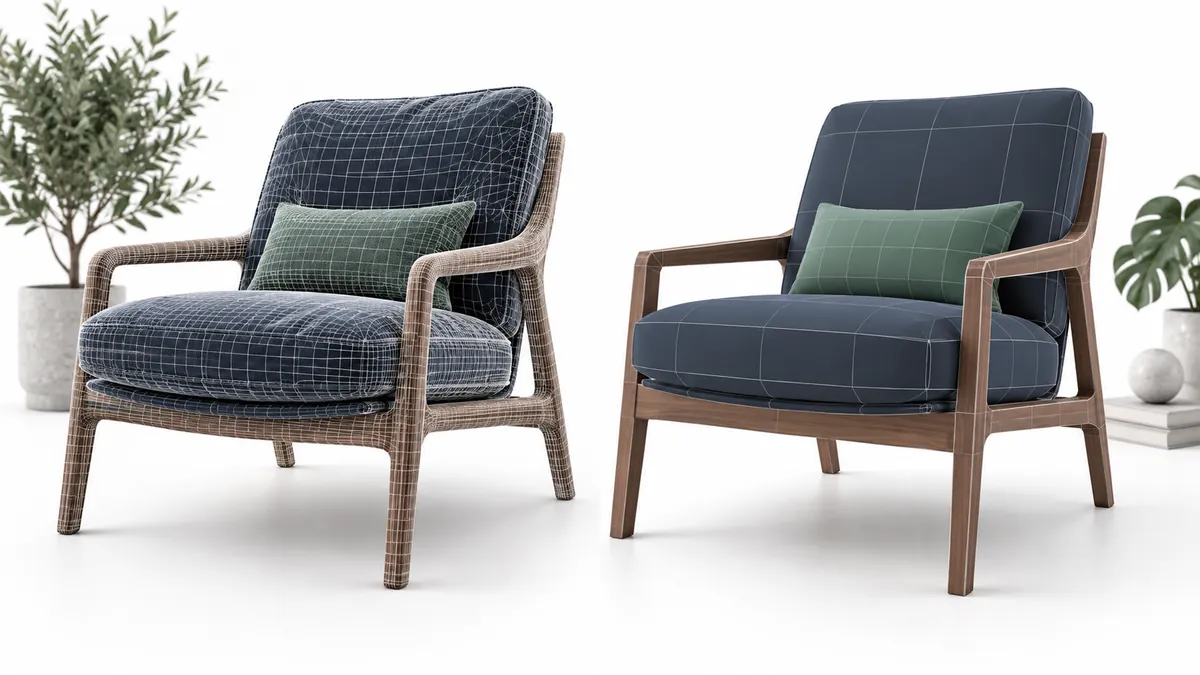
A chair can contain modelled stitching, a zip and concealed fittings. Some may be useful for a close product presentation. When the same file appears hundreds of times in a layout study, priorities change. Seating space, overall size, silhouette and necessary material distinctions can remain important while smaller parts deserve another look.
Open the view you intend to deliver first. A stitch that is unreadable in plan and unused in 3D is a candidate for simplification. Removing a line that identifies a material boundary or recognisable product feature may save a little geometry while weakening the drawing. Reduce a component because it contributes nothing to the intended output, not merely because it is small.
Revit's Coarse, Medium and Fine settings offer a useful distinction here. Family elements can be assigned visibility at different detail levels, as described in Autodesk's visibility guidance. Where a simpler plan and a more detailed close view are appropriate, one representation need not serve every purpose.
Simplifying a view and removing geometry are different interventions, however. Hidden components may remain in the file. If reducing content is the aim, examine what was actually changed as well as the screen result. If drawing clarity is the aim, an unchanged file size does not invalidate the improvement.
Display detail does not establish information completeness either. A refined object can still have an empty manufacturer reference. A simpler one may carry the required dimensions and schedule data correctly. Where the project uses an LOD or delivery definition, read the agreed geometry and information requirements rather than equating them with a display-menu setting.
How many objects does a parameter edit affect?
A parameter edit can have wider consequences than a geometric adjustment. The distinction in Autodesk's parameter explanation is fundamental: type parameters affect elements of that type; instance parameters affect individual placements. Consider whether that behaviour reflects the product before reorganising fields.
Tabletop thickness shared by every product of one type has a different purpose from the individual marks assigned to tables in a project. Changing one may reasonably affect all instances; changing the other may not. Place two instances of the same type and observe the behaviour rather than infer it from a field name.
A material parameter needs equally careful interpretation. If changing the tabletop finish also changes the legs, that may be right or wrong depending on how the product is supplied. A single material field will not suit every object, but a separate choice for every small component can burden the user with unnecessary decisions.
Before simplifying parameter names, understand their existing use. A clearer label does not itself establish that the schedule refers to the intended definition. Preserve the required data type and unit, and keep identifiers such as product references distinct from measurements. If two similar fields have unclear sources, resolve that ambiguity first.
Autodesk separately documents shared parameters in schedules. For your deliverable, the useful evidence is the field's actual value in the schedule. Seeing a name in the field selector is not the same as seeing the correct reference on the correct row. A small schedule with two instances and two types exposes this confusion early.
Separate the effects of simplification
Imagine reducing chair stitching while also changing type names, materials and parameter structure. The result opens more quickly but loses a scheduled value. Identifying which edit produced each outcome becomes difficult. Smaller groups of changes make the work easier to explain as well as easier to reverse.
Start with the original in the same test project. Hold the application version, view and instance count constant. In the first revision, simplify only the candidate geometry, then revisit the same types and schedule. Address representation or information changes afterwards, building on a result you already understand.
Once a single instance behaves properly, examine a group representative of the project. A hundred placements might provide a comparison between revisions; that number is not a universal limit. Observe opening and view switching under consistent conditions before attributing a delay directly to the family.
A note saying only “smaller” or “faster” loses useful information. Describe the removed feature, preserved drawing and tested types. If geometry stayed unchanged while a product reference was completed, the improvement is in the information. No file-size saving is required. A single quality score can obscure these worthwhile corrections.
Reconnect the final file with the product
After editing, review what the model now represents. Match experimental dimensions back to catalogue types, check material names and retain the correct reference. A variation created for testing should not become an apparently available manufacturer option.
When the download changes, its description, technical document and preview should describe the same revision. Compare the old image with the new geometry instead of assuming it still represents the file. This is part of manufacturer publication preparation: users should understand what they will receive before opening it.
For an unfamiliar file, the product and source assessment provides a starting point. Add the connections and views needed for actual use through the placement trial. The meaningful difference between two catalogue files is ultimately which one supports your drawings and decisions more accurately.